Everything Studio does.
All of it included.
One assistant across every specialty, in writing or out loud.
Talk to Riku out loud
Press, speak, and hear the answer read back. Your phone or browser does the listening with its built-in speech recognition, the same one behind the microphone key on your keyboard, and Rikuvo only ever receives the text. Works in the Studio app, and in Chrome and Edge on the web.
Ask Riku anything, in plain words
Riku is the lead on your builders. Ask what is happening and why, or tell it what to do next, from any page. Each app has its own chat, plus a design chat and a marketing chat of its own.
Riku does it for you, after you tap Yes
From the chat, Riku can send an over-the-air update, build for a store, save and run an automation such as a nightly check, answer an app's open question, read an app's screens, and start an export of your code and docs. Anything that ships, spends or reaches someone else asks you first with two buttons.
How the work gets planned, written and checked before you see it.
A second agent reviews every real change
Tests and lint run first. Then a separate reviewer reads the change and must approve it before it lands. Tiny changes to text skip review; nothing else does.
Only new failures are blamed
A change is judged against how the tests stood before it, so a test that was already failing never blocks it, and a test it broke always does.
Your vision and brand, read before every build
Each app has a vision page and a brand page you can edit. The builders read both before touching the app, so what they make follows what you wrote.
Bring your own art and music
Upload your own icons, illustrations and music for each app. Your own always replaces what Studio generated, and the builders reuse it, so you are asked once.
One app, several platforms
Pick where each app ships when you describe it, and change it later from its own page.
Sentry crash reports
Connect your Sentry account to see your crash-free rate and open issues in Insights. Turning it on drafts the wiring work for your builders hands free, and turning it off asks whether to tear it out or leave it in place.
Firebase Crashlytics crash reports
Connect the BigQuery export of your Firebase Crashlytics project with a read-only key to see crashes per day and open issues in Insights. Studio only reads the export, so nothing is added to your app, and turning it off asks whether to put the app back on Studio's own hub or leave it as it is.
PostHog analytics
Connect your PostHog project to see active users, new people and sessions in Insights. Turning it on drafts the wiring work for your builders hands free, and turning it off asks whether to tear it out or leave it in place.
Amplitude analytics
Connect your Amplitude project to see daily, weekly and monthly active users in Insights. Turning it on drafts the wiring work for your builders hands free, and turning it off asks whether to tear it out or leave it in place.
Mixpanel analytics
Connect your Mixpanel project to see active users, new people and retention in Insights. Turning it on drafts the wiring work for your builders hands free, and turning it off asks whether to tear it out or leave it in place.
RevenueCat revenue
Connect your RevenueCat project with a read-only key to see what your apps earn, plus active subscriptions and trials, in Insights. Nothing in your app changes, so turning it off just stops the reads.
Notices in Slack
Paste a Slack webhook address and Studio sends a message to that channel when something needs you or finishes. Nothing in your app changes, so turning it off just stops the messages.
Notices in Discord
Paste a Discord webhook address and Studio sends a message to that channel when something needs you or finishes. Nothing in your app changes, so turning it off just stops the messages.
Ask first or build on its own, set per app
Ask first waits for your yes on the app's own ideas, while what you add yourself runs. Build on its own runs unasked, but store submissions, anything needing your eyes and a builder's question still ask. The separate "Spend and publish without asking" switch clears money, public work and generated pictures.
Automations that run your apps unattended
Chain a trigger, a wait and an action: wake at six, build until the queue is clear, ship what passed, sleep. Describe it in plain words and it is drafted for you.
Everything between a finished change and a phone.
App Store review, handled
Studio submits the build, watches for Apple's verdict, reads the rejection notes, and files one fix per reason. It asks you for the code Apple texts you, and for one tap before the app goes back.
A failed build fixes itself
When a store build fails, a coding agent reads the log, works out why, and fixes it. If it cannot, you get the diagnosis in plain words instead of a log.
Store listings written and filled in for you
The App Store and Google Play listings are written from your app: title, description, keywords, and screenshots taken from the real app. Studio fills in the store forms and says exactly what each store still wants from you by hand.
Store artwork composed by an art director
The promo images for your listing are composed from your brand page by an AI art director, then checked by a critic before you see them. No templates.
Instant updates between store builds
A change that does not touch the native app is on every phone the next time the app opens. Studio knows which changes need a real store build, and says so.
Comments on a release become work
Every member with access can comment on a release. One tap turns a comment into a piece of work for the builders.
Drafted artwork judged before you see it
Drafted artwork judged before you see it
Generated icons and illustrations are judged against your brand first. A wrong one is redone up to three times, and the notes you write when you ask for a change teach it your taste.
What happens once people are using the app.
Bug reports become fixes on their own
A report from inside your app arrives with a screenshot, is graded for severity so junk never becomes work, and is filed to the builders as a ticket.
Crashes and usage, per app
Crash-free rate, funnels you define, an event explorer, and revenue once you connect it, on each app's Metrics page.
A feed that says what to look at
Evidence-backed suggestions written from your real numbers. When there is nothing worth saying, it says nothing.
Getting people to the app, and seeing what brought them.
Where your work lives and who can see it.
Nightly encrypted backups
Every night, each app's full history and the keys it needs to run are encrypted and copied out of your workspace, and a week of copies is kept.
Passkeys, no passwords
Sign in with your face or fingerprint. Lose a device and a code by email lets you enrol a new passkey; a signed-in session is never handed out by email.
Five members, each with their own access
Invite a co-founder, a designer or a client, choose which apps each may touch, and remove them any time.
Your own workspace, talking outward only
Your apps are built in a private workspace that is yours alone. It accepts no connections from the internet; it only talks outward to your dashboard.
Support that leaves a trail
If the Rikuvo team opens your dashboard to help, it is logged before the page loads, and the log is shown on your own Settings page.
Leave with everything
Cancel any time. Your dashboard stays read-only for 14 days, and every app is packed up as an ordinary project for you to download.
Credit for finding Studio bugs
A bug you report about Studio takes a dollar off your next invoice when it is accepted, and an idea that ships takes five, up to half your bill each calendar month.
Say it out loud, from anywhere.
Press the mic and talk, or add the control to iOS Control Center or the Android quick settings shade. One press opens Talk with the microphone already listening, straight from the lock screen.
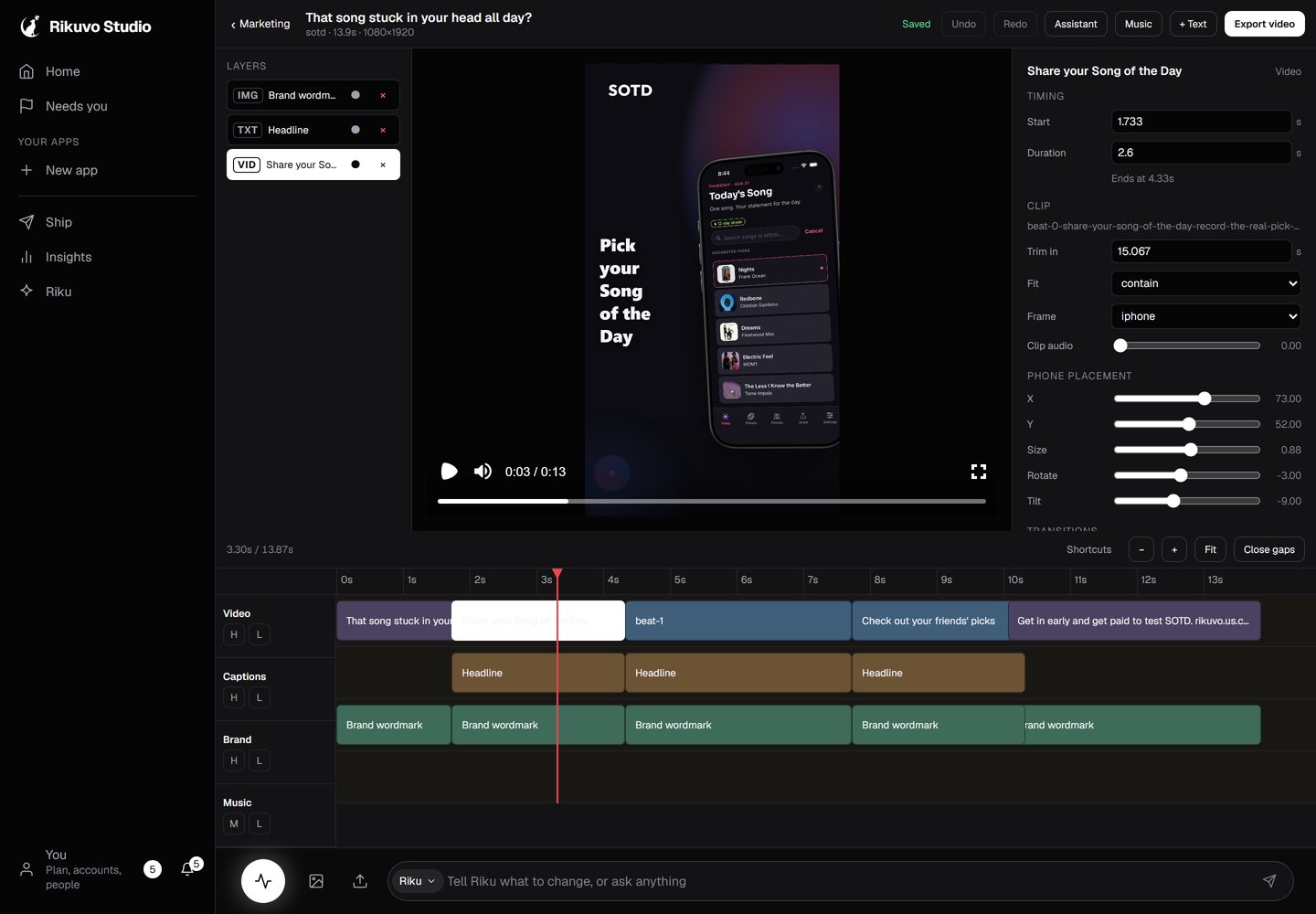
A video editor that already knows your app.
Studio records your real, running app, writes the script, and hands you a proper timeline: clips, captions, music, trims. Nothing is stock, because every frame came from the app you shipped.